
 New in MetaKocka
Copy an inbound order
Deliveries from the same supplier often contain the same products. You can now copy a previous inbound order and change only what is different.
In Order Management and Fulfillment App
When a supplier delivers similar goods every week or month, entering an inbound order with many lines takes a lot of time. With a copy of the previous order, you only correct the quantities. Copying works in both Order Management and Fulfillment App.
How it works
Open Warehouse, Received, tab Inbound orders. Find the previous order from the same supplier, for example with the Supplier filter, and select it. In the bar at the bottom, click Copy.
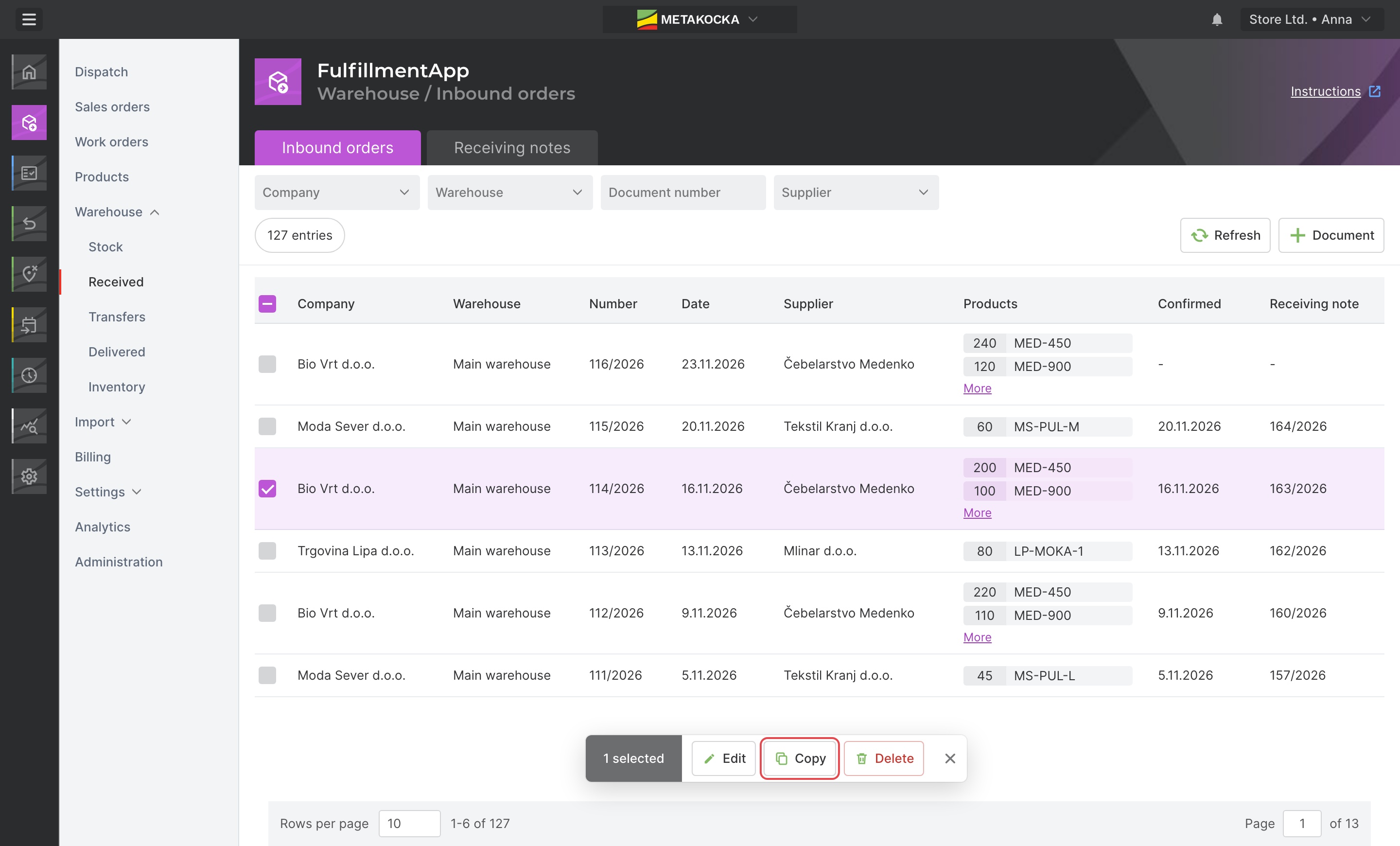
You get a new inbound order with the same lines. Correct the quantities, add or remove a product if needed, and save the order.
Lots, serial numbers and pallet or box details on the lines are copied too, so check them along with the quantities.
If the supplier is not in the codebook yet, you can add it directly on the inbound order.
Instructions and further information:
Warehouse operations in Fulfillment App · Receiving note in Order Management · MetaKocka support
Wishing you business success,
MetaKocka Team
Would you like to be informed about news and optimizations?